
Polished single-image posts, in a click.
One topic in, a finished image, headline and ready-to-publish caption out, already in your brand.
Sign up →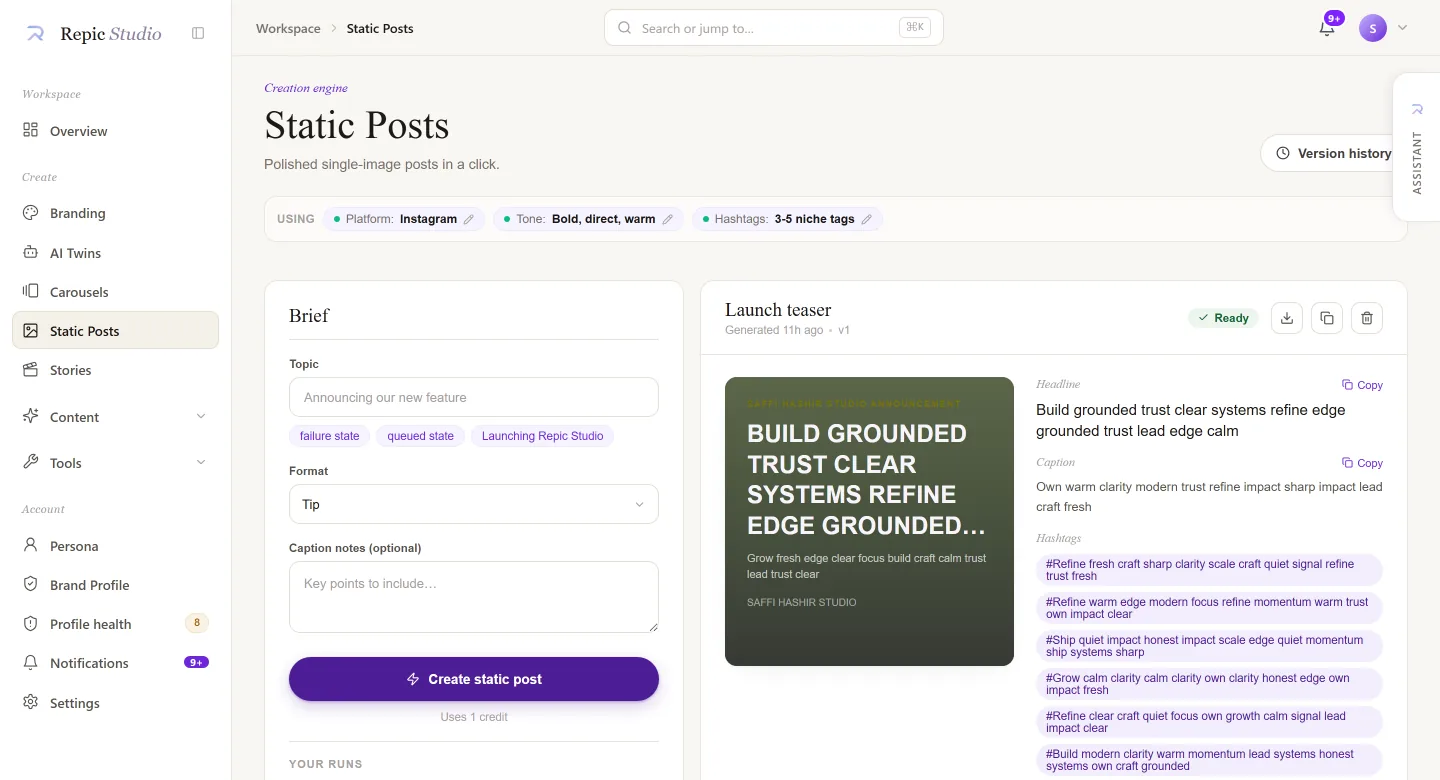
A single square, and nowhere to hide.
A carousel can recover on slide four. A static post cannot. Everything lands in one frame, which is why this engine spends its effort on fewer decisions made better.
- 01
The frame
One square, sized per platform, with the safe area already respected.
- 02
The image
Generated or yours, colour-matched to the kit rather than dropped on top of it.
- 03
The words
Headline and caption written from the same profile, so they agree.
- 04
The grid
It has to survive being seen next to your last eleven posts.
Topic in. Post out.
You give it a topic
“Launching Repic Studio.” Pick a format, tip, announcement, quote, and optionally add caption notes.
It reads your brand, not a template
Voice, palette, type and platform arrive pressed into the Context Strip from your persona and kit, nothing re-explained.
A post lands in your history
Image + headline + caption, versioned with honest statuses, ready, queued, failed. Download, copy, or refine.
The anatomy of a post.
The visual
Sized to your platform, drawn from your kit's palette and type, not a stock template.
The headline
The hook, written in your voice, with variants for when one word matters.
The caption
Ready to publish, with a CTA line that matches what you're actually asking for.
The hashtag set
From your brand defaults, assumed until you set them, and honest about it.
What this engine reads from your brand:
Real outputs only.
These slots hold real runs from our three sample brands as they land, never staged, never stock. Status today: Rolling out
For the detail-minded.
Input schema
Statuses & history
Every run is saved to your Studio history and versioned, re-run or refine from any version. Statuses are honest:
Limits & notes
One visual per run, regenerate the caption without touching the image. Heavy load shows as queued, never as fake progress.
3 min read · 6 sections
One frame, and everything that has to be right in it
A single-image post is the least forgiving format there is. There is no second slide to recover on and no caption long enough to rescue a bad frame. Everything has to agree at once: the image, the headline sitting on it, and the caption underneath.
That is exactly why generating it from a brand profile rather than a prompt matters. Repic takes one topic and produces the image, the headline and a ready-to-publish caption as a set, all three drawn from the same kit. The headline is set in your type pairing, the image respects your palette, and the caption follows your voice rules rather than defaulting to the same three cheerful sentences every AI tool writes.
Because the three are generated together, they are not three separate things you now have to reconcile. That reconciliation work, quietly, is most of the time people spend on "quick" posts.
Step by step, with nothing skipped
A topic, and nothing else required
One line. Everything the engine would otherwise ask you (tone, palette, type, audience) it already has.
Image, headline and caption as one set
Generated together so the headline fits the image and the caption extends rather than repeats it.
Rendered through your kit
Your palette, your type pairing, your voice. Nothing to configure per run.
Saved, versioned, honest about status
Every run is in your history with a real status. Heavy load shows as queued, never as invented progress.
What "as a set" means
Before
The usual workflow: generate an image in one tool, write a headline in another, ask a chatbot for a caption, then spend twenty minutes making the three agree.
After
One topic in. An image in your palette, a headline in your type pairing that fits the composition, and a caption in your voice that adds a thought rather than restating the headline.
The saving is not the generation, which was always fast. It is the reconciliation, which was never counted.
What this does not do
It is not a photo editor
You get a finished frame. Cropping, retouching and compositing live in the Tools workbench, not here.
It does not put your face in the frame
Likeness output comes from a consented AI Twin, not from a static-post run.
It does not write claims for you
If your post asserts a result, that has to be your result. The engine writes in your voice; it does not supply proof.
Straight answers
Can I edit the headline or the caption after generating?
Yes, both, and the edit is saved as a new version rather than overwriting the run. Nothing about the output is read-only, and nothing you edit is silently lost.
What if the image is wrong but the words are right?
Regenerate the image without touching the copy. They are generated as a set but they are not welded together, which is the practical difference between a set and a bundle.
Do I need to write a prompt for the image?
No, and that is the design. The image brief is derived from the topic and your kit. If you want direct prompt control over an image, that is what the image generation tool in the Tools workbench is for.
Is the caption really publish-ready?
It is written to be posted as-is, in your voice and your tag style. Read it first anyway; you are the person whose name is on it, and Repic never posts on your behalf.
Free, no signup
Not ready to sign up? Run the brand kit generator instead.
Generate a complete brand kit free: palette with tints and shades, a font pairing, logo direction, and the brand voice other kit tools leave out.